需求描述

在使用 WebView 的项目中,一个常见的需求是将页面内的链接跳转限制在 WebView 内,而不是使用外部浏览器打开,但 WebView 的默认行为是将链接点击事件作为 Intent 发送给系统,由系统决定如何处理(通常的行为是使用浏览器打开或是弹出浏览器选择对话框),那么如何实现期望的效果呢?

实现方案

文章关于用WebView或手机浏览器打开连接问题给出了一种使用 WebViewClient#shouldOverrideUrlLoading方法的方案可以达到效果,但其使用该方法的方式是错误的,且被广泛传播。因此,有必要在此澄清一下。

WebView#shouldOverrideUrlLoading 的 api doc 如下

1
2
3
4
5
6
7
8
9
10
public boolean shouldOverrideUrlLoading (WebView view, String url)

Added in API level 1
Give the host application a chance to take over the control when a > new url is about to be loaded in the current WebView. If WebViewClient is not provided, by default WebView will ask Activity Manager to choose the proper handler for the url. If WebViewClient is provided, return true means the host application handles the url, while return false means the current WebView handles the url. This method is not called for requests using the POST "method".

Parameters
view  The WebView that is initiating the callback.
url   The url to be loaded.
Returns
True if the host application wants to leave the current WebView and handle the url itself, otherwise return false.

翻译一下,三种情况:

  1. 若没有设置 WebViewClient 则在点击链接之后由系统处理该 url,通常是使用浏览器打开或弹出浏览器选择对话框。
  2. 若设置 WebViewClient 且该方法返回 true ,则说明由应用的代码处理该 url,WebView 不处理。
  3. 若设置 WebViewClient 且该方法返回 false,则说明由 WebView 处理该 url,即用 WebView 加载该 url。

因此,开篇的需求使用如下方法即可实现:

设置 WebViewClient 且在其 shouldOverrideUrlLoading 方法返回 false

示例程序见 WebViewClientTest

问题说明

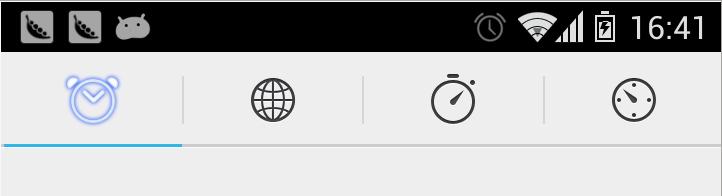
修改 ActionBar Tabs 模式在 Theme.Holo.Light 下的样式,以前是这个样子滴

现要改成如下样式

实现方式

打开 SDK 里的 Theme 文件 <ANDROID_SDK>/platforms/android-4.2/data/res/values/themes.xml,与 ActionBar 相关的属性如下:

1
2
3
4
5
6
7
8
9
10
11
12
13
14
15
16
<!-- Action bar styles -->
<item name="actionDropDownStyle">@android:style/Widget.Holo.Light.Spinner.DropDown.ActionBar</item>
<item name="actionButtonStyle">@android:style/Widget.Holo.Light.ActionButton</item>
<item name="actionOverflowButtonStyle">@android:style/Widget.Holo.Light.ActionButton.Overflow</item>
<item name="actionModeBackground">@android:drawable/cab_background_top_holo_light</item>
<item name="actionModeSplitBackground">@android:drawable/cab_background_bottom_holo_light</item>
<item name="actionModeCloseDrawable">@android:drawable/ic_cab_done_holo_light</item>
<item name="actionBarTabStyle">@style/Widget.Holo.Light.ActionBar.TabView</item>
<item name="actionBarTabBarStyle">@style/Widget.Holo.Light.ActionBar.TabBar</item>
<item name="actionBarTabTextStyle">@style/Widget.Holo.Light.ActionBar.TabText</item>
<item name="actionModeStyle">@style/Widget.Holo.Light.ActionMode</item>
<item name="actionModeCloseButtonStyle">@style/Widget.Holo.Light.ActionButton.CloseMode</item>
<item name="android:actionBarStyle">@android:style/Widget.Holo.Light.ActionBar.Solid</item>
<item name="actionBarSize">@dimen/action_bar_default_height</item>
<item name="actionModePopupWindowStyle">@android:style/Widget.Holo.Light.PopupWindow.ActionMode</item>
<item name="actionBarWidgetTheme">@null</item>

Tab 相关的属性分析是

  • actionBarTabBarStyle – 多个Tab的容器样式
  • actionBarTabStyle – 单个Tab样式
  • actionBarTabTextStyle – Tab上的字体风格

我们需要修改的样式有以下几部分

  • TabBar 背景色
  • 多个 Tab 之间的分隔符
  • Tab 背景色

创建 style.xml

style.xml
1
2
3
4
5
6
7
8
9
10
11
12
13
14
15
<resources>
    <style name="MyActionBarTabBarStyle" parent="@android:style/Widget.Holo.Light.ActionBar.TabBar">
        <item name="android:background">@drawable/actionbar_tabs_bar_bg</item>
        <item name="android:divider">@drawable/actionbar_divider</item>
    </style>

    <style name="MyActionBarTabStyle" parent="@android:style/Widget.Holo.Light.ActionBar.TabView">
        <item name="android:background">@drawable/actionbar_tabs_bg</item>
    </style>

    <style name="AppTheme.Holo.Light" parent="@android:style/Theme.Holo.Light">
        <item name="android:actionBarTabBarStyle">@style/MyActionBarTabBarStyle</item>
        <item name="android:actionBarTabStyle">@style/MyActionBarTabStyle</item>
    </style>
</resources>

@drawable/actionbar_tabs_bgStateListDrawable

actionbar_tabs_bg.xml
1
2
3
4
5
6
7
8
9
10
11
12
13
14
<?xml version="1.0" encoding="utf-8"?>
<selector xmlns:android="http://schemas.android.com/apk/res/android">

    <!-- Selected states -->
    <item android:drawable="@drawable/actionbar_tabs_bg_pressed" android:state_focused="false" android:state_pressed="false" android:state_selected="true"/>
    <!-- Focused states -->
    <item android:drawable="@drawable/actionbar_tabs_bg_pressed" android:state_focused="true" android:state_pressed="false" android:state_selected="false"/>
    <item android:drawable="@drawable/actionbar_tabs_bg_pressed" android:state_focused="true" android:state_pressed="false" android:state_selected="true"/>
    <!-- Pressed -->
    <item android:drawable="@drawable/actionbar_tabs_bg_pressed" android:state_pressed="true"/>

    <item android:drawable="@android:color/transparent" android:state_focused="false" android:state_pressed="false" android:state_selected="false"/>

</selector>

参考